Your Computer Room: From Clutter Hub to Creative Command Center
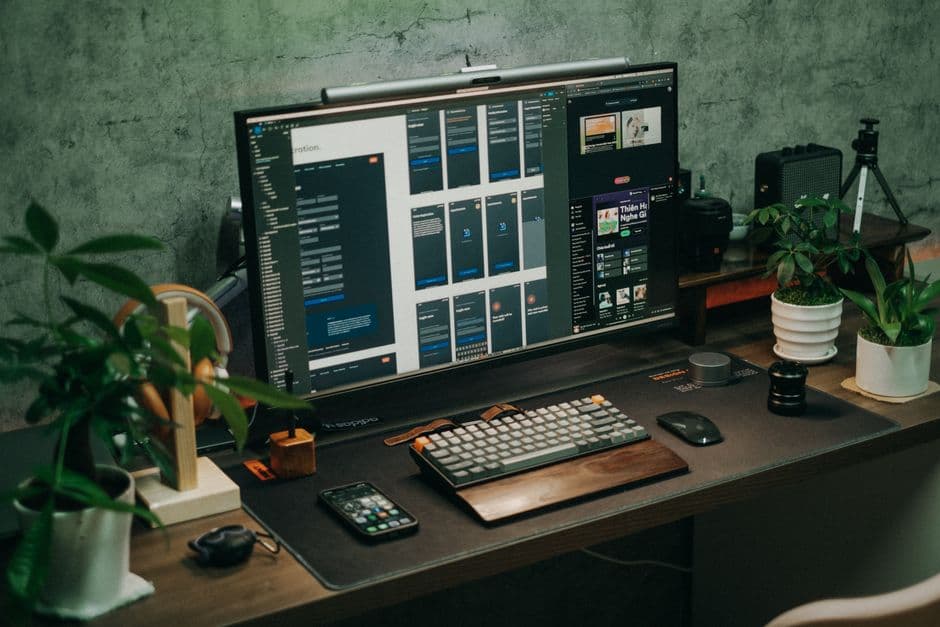
Forget just more gear. The modern computer room is about smart design, seamless workflows, and a space that truly fuels your tech passions.
The phrase "computer room" used to conjure images of tangled cables, a dusty tower humming ominously, and maybe a printer that’s perpetually out of ink. It was a functional space, yes, but rarely inspiring. My own early ventures into PC building involved more than a few late nights wrestling with IDE cables and praying I hadn’t fried a motherboard. I learned early on that while the specs on paper are important, how you actually use the machine and the environment it lives in makes a world of difference.
Nowadays, that space is evolving. It's not just about cramming in the latest hardware for a faster frame rate or quicker render time; it's about crafting a personalized hub that actively enhances productivity, sparks creativity, and deepens our engagement with technology. This isn't about buying more expensive gear for the sake of it. It’s about thoughtful design and optimizing your workflow so that your tech helps you achieve more, whether that’s crunching numbers for a side hustle, editing your latest video project, or conquering virtual worlds.
The Foundation: More Than Just a Desk
Let's start with the centerpiece: the desk. I’ve seen too many setups where the desk is an afterthought, a hand-me-down that barely fits the monitor, let alone accommodates a decent keyboard, mouse, and a few essential peripherals. This is where things can start to go wrong. A desk that’s too small leads to cramped ergonomics, which can cause discomfort and fatigue. A desk that’s too low or too high messes with your posture, and trust me, that'll catch up with you.
When I'm advising on a new build or a workspace upgrade, I always stress the importance of desk size and adjustability. For a dual-monitor setup or anyone who uses a lot of physical tools – think drawing tablets or audio interfaces – you need surface area. A larger desk, even a simple, sturdy one, prevents that feeling of being boxed in.
Then there’s the standing desk craze. While not every setup needs one, the ability to switch positions throughout the day can be a game-changer for energy levels and focus. I’m not talking about the flashy, app-controlled ones with memory presets (though those are neat if that's your jam). I’m talking about a reliable crank-based or simple electric lift desk. The goal is functionality and supporting your physical well-being during long sessions. A desk that’s too wobbly or too difficult to adjust quickly becomes a hassle, and you'll just end up sticking to one position, defeating the purpose.
Cable Management: The Unsung Hero
This is the part that separates the truly organized from the... well, from me in middle school. Visible, unruly cables are more than just an eyesore; they can be a tripping hazard, collect dust, and make troubleshooting a nightmare. Remember that time you tried to unplug a single USB drive and ended up yanking out three other crucial cables? Yeah, that.
I’m a big fan of the simple, utilitarian approach here. Cable ties, Velcro straps, and under-desk raceways can make a monumental difference. They aren’t flashy, and they certainly don’t improve your PC’s frame rate, but they create a sense of calm and order. When everything has its place and isn't a tangled mess, you can actually focus on what you’re doing.
Some people go all out with integrated cable management systems built into their desks or elaborate under-desk routing. That’s great if you have the budget and the inclination. But honestly, a few well-placed zip ties and a trip to the hardware store for some conduit can achieve 90% of the benefit for a fraction of the cost. It’s about creating a clean aesthetic and a more functional workspace.
Lighting: Beyond the Gloomy Glow
The stereotypical "computer room" lighting is often just the harsh glare of a desk lamp or the ambient light from the monitor. This is terrible for your eyes and can really impact your mood and focus. Good lighting is crucial, and it’s more nuanced than just having a light.
I advocate for a layered lighting approach. First, you need ambient light to reduce the contrast between your screen and the room. This could be an overhead light, a floor lamp, or even bias lighting behind your monitor. Bias lighting, in particular, helps reduce eye strain by providing a soft glow around the screen, making the display less jarring.
Second, task lighting. This is your desk lamp, positioned so it illuminates your work area without causing glare on your screen. Adjustable arms are a big plus here, allowing you to direct light exactly where you need it.
Finally, for those who like a bit of flair or want to set a mood for gaming or creative work, accent lighting can be great. Think smart RGB strips behind your desk or monitor. The key here is control. Being able to adjust brightness and color temperature (warm for relaxed evening work, cool for intense focus) makes a significant difference. A room that’s too dark or too bright, or lit with a single, harsh source, is draining. A well-lit space feels more energetic and inviting.
Ergonomics and Comfort: Your Body Will Thank You
This ties back to the desk and lighting, but it deserves its own mention. Spending hours at a computer, whether for work or play, puts a strain on your body. Investing in good ergonomics isn't a luxury; it's a necessity for long-term health and productivity.
Your chair is paramount. I’m not saying you need a top-of-the-line Herman Miller, though if you can swing it, they’re fantastic. But you do need a chair that supports your back, allows you to sit with your feet flat on the floor, and has adjustable armrests. I’ve used some surprisingly good mid-range office chairs that offered excellent support without breaking the bank. The goal is to avoid slouching and maintain a neutral spine.
Beyond the chair, think about monitor height. Your screen should be at eye level, with the top of the monitor roughly in line with your gaze. This prevents you from craning your neck up or down. Monitor arms are excellent for this, as they free up desk space and allow for easy height and angle adjustments.
Keyboard and mouse placement also matters. They should be positioned so your wrists are straight and your elbows are at about a 90-degree angle. This is where a good desk height and armrests really come into play. Small additions like a wrist rest can provide additional comfort for some users.
Sound Design: Beyond the Generic Beep
The audio experience in your computer room can transform it. This isn’t just about loud explosions in games, though that’s part of it. It’s about the subtle cues in a workflow, the crispness of dialogue in a video call, or the immersive soundtrack to a creative project.
For immersive gaming or movie watching, a decent pair of headphones or a good speaker setup is key. I tend to lean towards reliability. A pair of well-regarded, comfortable headphones can be fantastic for deep focus and detail. If you prefer speakers, look for something with clear mids and highs, and a bit of bass that doesn't overpower. Avoid tinny, cheap speakers that make everything sound harsh.
For productivity, clear audio is essential for calls and any voiceover work. A dedicated microphone, even an entry-level USB mic, can dramatically improve your voice quality compared to a headset mic or your laptop’s built-in one. The difference it makes in how you’re perceived on calls can be surprisingly significant.
The "Why": Enhancing Your Passion
Ultimately, building an optimized computer room is about intention. It’s about recognizing that the space where you spend so much time interacting with technology deserves attention. It's about moving beyond just the specs on a box and creating an environment that actively supports your goals, whether that’s building the next killer app, composing a symphony, or simply having a more enjoyable gaming session.
When I look at a setup, I’m not just seeing components. I’m seeing potential. A well-designed space removes friction, reduces fatigue, and allows you to enter a state of flow more easily. It’s the boring-but-reliable cable management that lets you focus on your work, the thoughtful lighting that keeps your eyes from burning out, and the comfortable chair that lets you stay immersed in your passion for longer. It’s the difference between a room that houses your computer and a room that’s an extension of your digital self.