The Boring XPS 14 Comeback That Put Dell Back on Track
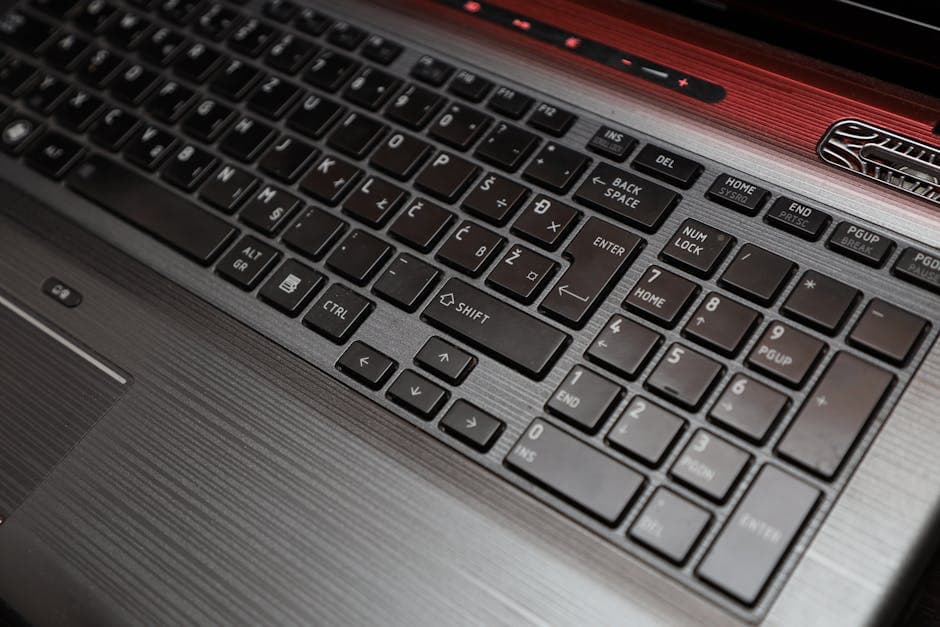
Dell's XPS 14 resurfaces with physical buttons and a trackpad you can actually find—proving that sometimes the best innovation is admitting you were wrong.
There's a lesson buried in Dell's XPS 14 resurrection, and it's not one the laptop industry likes to admit: sometimes the best innovation is admitting you were wrong.
Less than a year after Dell consolidated its consumer and prosumer laptop lines under broader product tiers in 2023–2024, the company is bringing back the XPS brand. Not with a reinvented vision or a flashy Copilot+ sticker, but with something far more radical: physical function keys and a trackpad with visible left-and-right borders.
That might sound like nothing. It's actually everything.
I've built enough PCs to know that the best features are usually the ones users don't have to think about. A keyboard that just works. A trackpad you can find without squinting. These aren't selling points; they're the price of admission. Yet somehow, in the quest to prove that minimalism equals premium, Dell spent the last two years convincing itself that capacitive function keys were acceptable—keys that didn't actually move. The previous generation's XPS trackpad blended seamlessly into the palm rest, but users struggled to pinpoint where the "usable" area actually was.
Working professionals hated it. And they told Dell.
What's remarkable is that Dell actually listened. At CES 2025, the company unveiled the new XPS 14 with a design philosophy that amounts to a hard reset: bring back the tactile feedback that made the XPS line work in the first place. The trackpad now has subtle borders on the left and right that let you know you've reached the edge. The function keys are physical, mechanical, and responsive. There's no apology quote needed—the product itself is the statement.
Here's the thing: none of this is flashy. There's no AI marketing angle. No revolutionary material science. No "0.1mm thinner" claim. It's just buttons that feel like buttons, and a trackpad you can actually locate. The market has spoken, and it's not asking for future-forward design theater. It's asking for usability.
What Actually Changed
The XPS 14 weighs 3 pounds, down from its predecessor, which suggests Dell got the weight equation right once it stopped obsessing over making things vanish. That matters because it's still portable—you can actually live with it—without the gimmicks.
Power-wise, all models integrate Intel's Panther Lake Core Ultra Series 3 chips and offer OLED display options. But the real story isn't clock speeds—it's battery life and the display options you can pair them with.
Dell claims up to 27 hours of video streaming on the non-touch 1920-by-1200 LED display configuration, though actual results will depend on brightness, workload, and specific SKU. The important part: you have real choices here. You can pick the non-touch LED panel if battery life is your priority, or step up to the 2.8K Tandem OLED touchscreen if you want the visual luxury—and that's a real trade-off worth thinking through.
The Tandem OLED is legitimately impressive when you see it in person. By stacking two OLED layers, it hits higher peak brightness (around 3,000 nits) while maintaining those inky, infinite blacks that make HDR content look incredible. It's the kind of display that makes you rethink what "premium" means. But it's also a luxury layer on top of something that already works.
If battery life is your core concern, the non-touch LED option delivers the kind of all-day endurance that professionals actually need—especially if you're in meetings or teaching all day and can't dock the machine.
The Pattern Nobody Wants to Admit
What bothers me about this whole arc is the assumption that manufacturers have been pushing for years: that design progress only happens through subtraction and abstraction. Fewer buttons. Fewer ports. Fewer visual cues. The implication is that complexity is the enemy of elegance.
But the XPS 14's comeback suggests something different. Sometimes design progress means knowing when to stop iterating on the edge case and focus on the actual job. A function key doesn't need to be smart. It needs to be there.
Dell's decision to revive the XPS brand at all—to walk back the consolidation play—is an admission that professional users have more power than quarterly earnings calls suggest. And their decision to ship physical buttons and trackpad borders is a statement that you can be premium without being inaccessible.
The Dell XPS 14 is probably the best XPS laptop ever made. Not because it's thinner or lighter or packed with novelty features. Because it's finally boring enough to do the work without getting in the way. That's a lesson that probably won't stick—the industry will find some other polished failure to champion next year. But for now, the most innovative laptop on the market is the one that admitted it was overthinking things.
If you're in the market, the Dell XPS 14 starts at $1,599 on Dell's website. Initial stock is moving fast.